Performance Max campaigns: what to know
Not the generic "these are asset groups, these are listing groups" version. What the technology really is, why that matters, and what we look at when we open one.
Let us quickly describe what Performance Max campaigns are — not in the generic “these are asset groups, these are listing groups” sense. Let us discuss what the technology really is and why that matters. It is worth saying that before getting into the details.
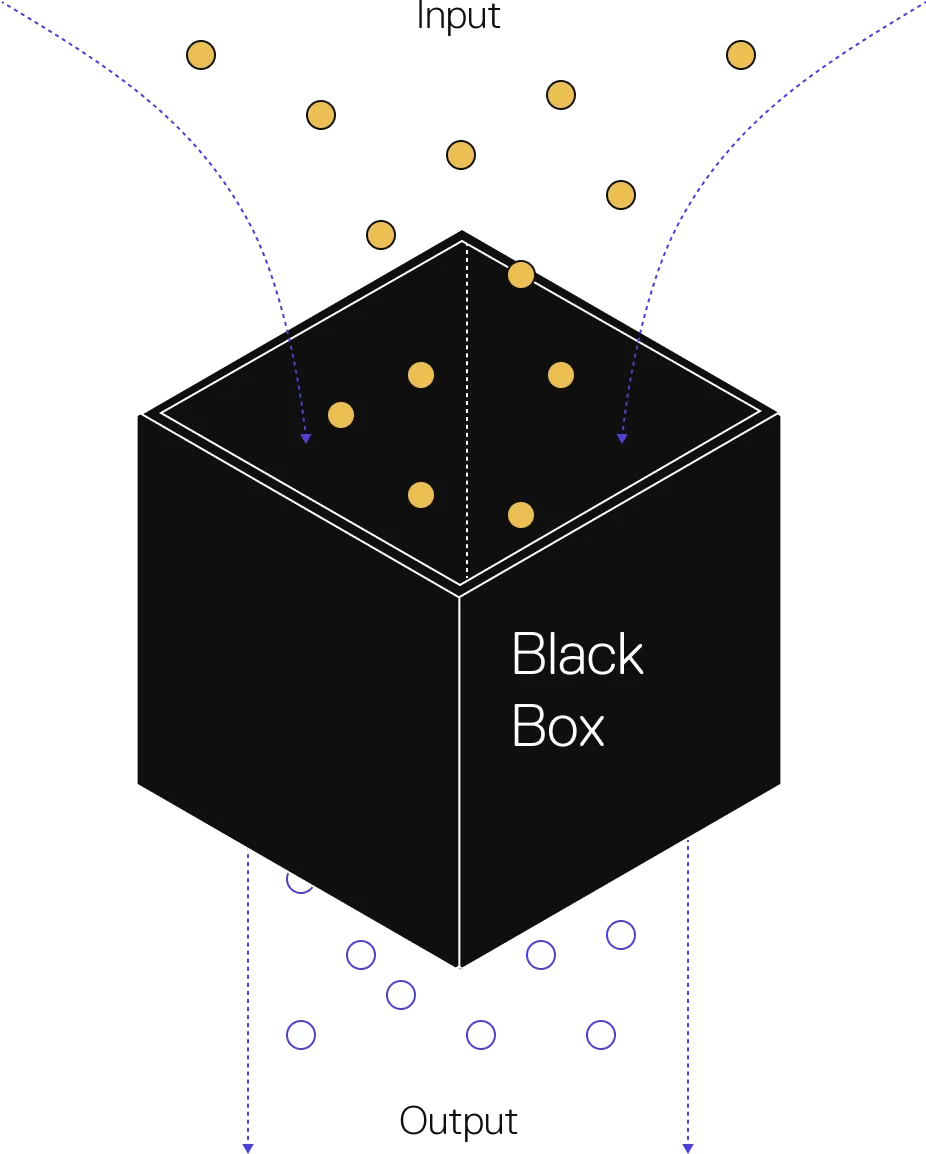
Performance Max according to Google
Google has automated auctions with Smart Bidding for years, and then launched a more-or-less plug-and-play ecommerce campaign type with Smart Shopping campaigns. Performance Max for Retail eclipses the ambition of both, by far.
The best definition of Performance Max is probably the one in Google’s API documentation: “a unified buying service to all Google Ads inventory.”
That means a complete de-channeling of Google Ads, for retail and non-retail businesses alike. Which in turn means Google is automating four things at once: bids, budget allocation, placements, and creatives.
Why Performance Max campaigns are special
Performance Max is a strange, speckled beast. It is reminiscent of Smart Shopping, Responsive Display and Dynamic Search all at once. Google is continuing its strategy of absorbing and simplifying formats, and replacing them with automated approaches.
For retail campaigns, Performance Max goes hand in hand with new developments in Merchant Center, which in turn holds more gravity as the gateway to Google’s Shopping Graph.
Standard campaigns might never be removed. But they will shrink into something vestigial, like a tailbone or an appendix.
PMax approaches
Broadly speaking, there are currently two main approaches to Performance Max for ecommerce projects.
With Assets (full build). This means we intend to use all the capabilities of PMax. Along with the connected product feed, all assets and ad extensions are filled in. The result is maximum coverage across formats — Search, Shopping, Display, Video, Discovery, Gmail and Maps. However, this approach is not always ideal, because it blends users from different stages of the sales funnel.
Without Assets (feed only). Here we focus solely on the Shopping format. We ignore filling in any assets or extensions and use only the product data from Merchant Center. This is the closest thing to what Smart Shopping was before PMax came along. It makes PMax concentrate on the Shopping format and almost entirely disregard the others. Almost — because the algorithms can still generate assets from data on your website pages. In practice the proportion of those impressions is extremely low, and below I show how to reduce it to a minimum.
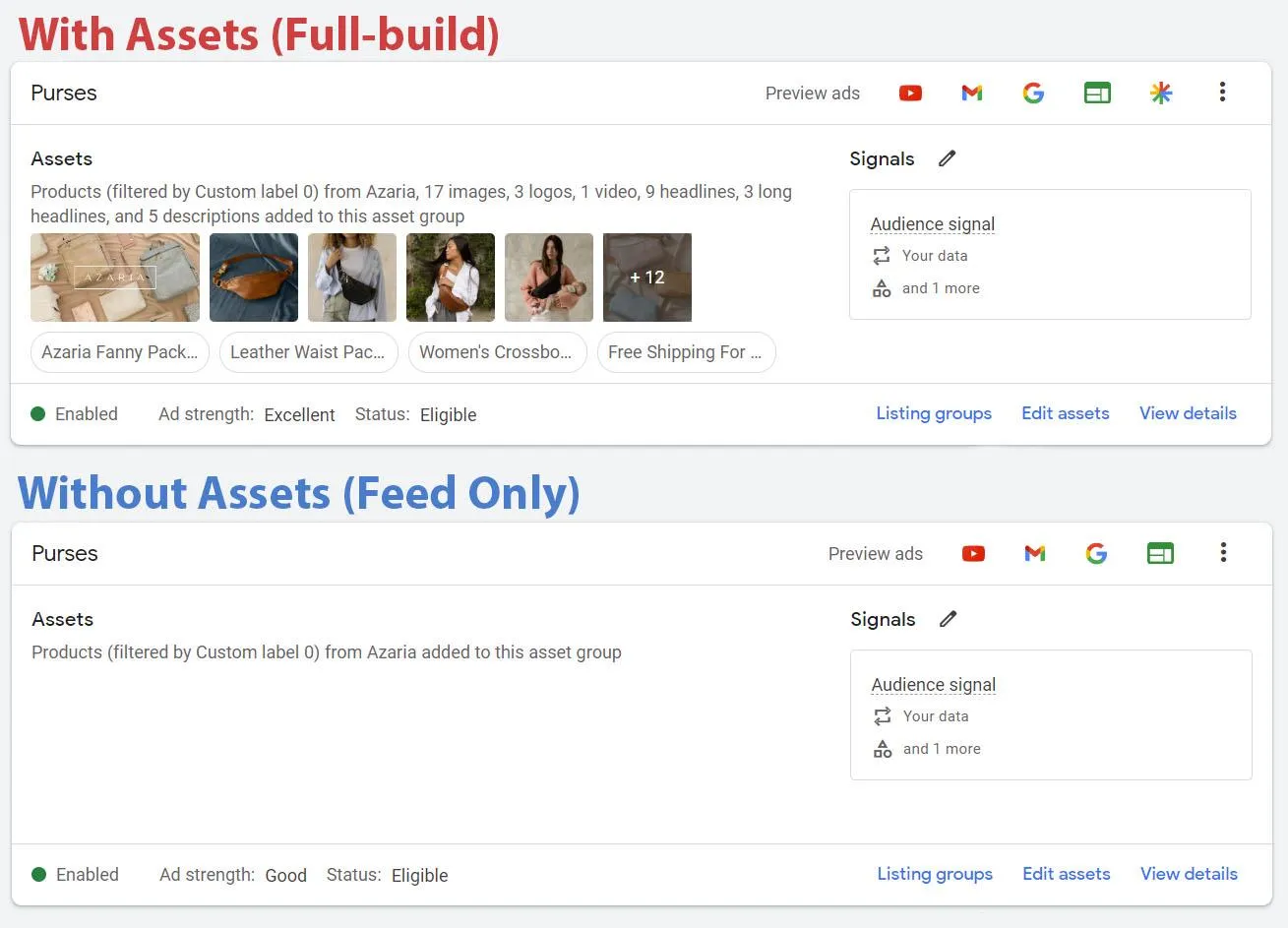
The same campaign, built both ways. Note that “ad strength” drops to Good on feed only — that is expected, not a problem to fix.
In ecommerce projects I increasingly prefer the feed-only approach. Google wants the market to embrace full-funnel campaigns, but advertisers are rarely enthusiastic about that, and finding ways to segment budget and reporting for different funnel stages remains attractive to many.
Two more reasons:
- The Display portion of PMax is too spammy for some advertisers. Running feed-only PMax and Demand Gen in parallel lets us cover premium ad inventory while leaving the less attractive placements behind.
- Full-build PMax and Demand Gen have overlapping scope, and it is not 100% clear how priority gets resolved between them (presumably ad rank). Both can serve YouTube and YouTube Shorts, Discovery and Gmail. Feed-only PMax reduces that overlap.
PMax structures
There are numerous structures within PMax, ranging from a single asset group holding all products to various assets split by product category, theme, or audience signal. The same applies at campaign level. We can keep products in a single campaign or separate them into dozens, based on efficiency goals, target ROAS, location and so on.
But the days of ultra-granular campaigns are over. We need to focus on identifying segments of meaningful size and meaningful difference.
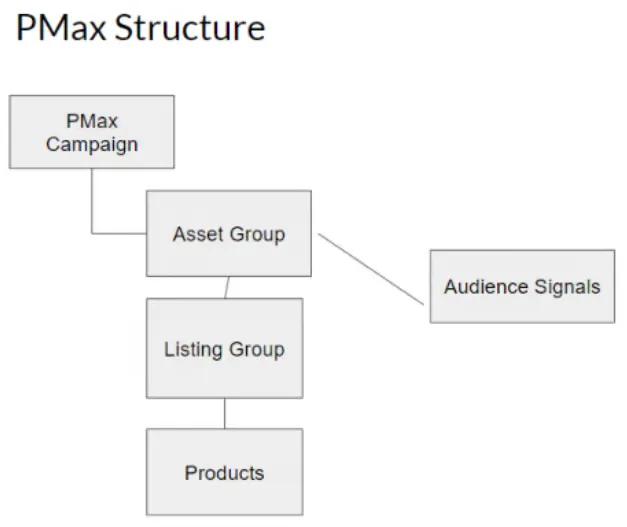
In the approach with assets, we can use different asset groups to divide products within a single PMax campaign. Using identical sets of products in different asset groups is not an error — the ad that ranks higher ultimately receives the impression.
In the feed-only approach, creating a large number of asset groups does not make sense, because almost any division can be made at product level within a single asset group. Although there are times when we need to target different audiences with audience signals, and in those cases we split by asset group even on feed only.
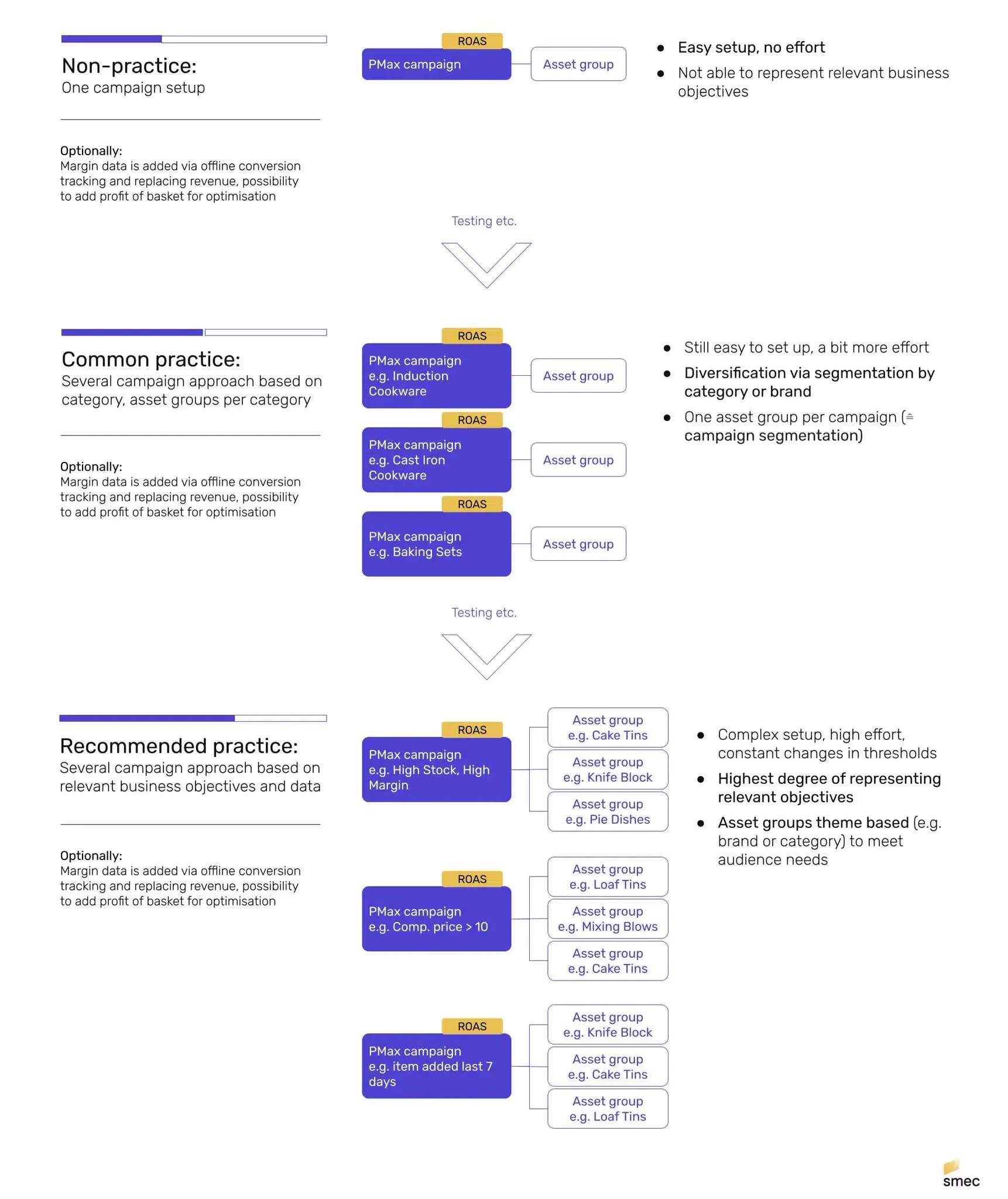
It makes sense to separate PMax campaigns when we want more control over budget and target ROAS, because neither can be set at asset-group or product level. Those settings are available only at campaign level.
Combining approaches and structures is what produces a strategy, and choosing the right strategy is the key to success with PMax.
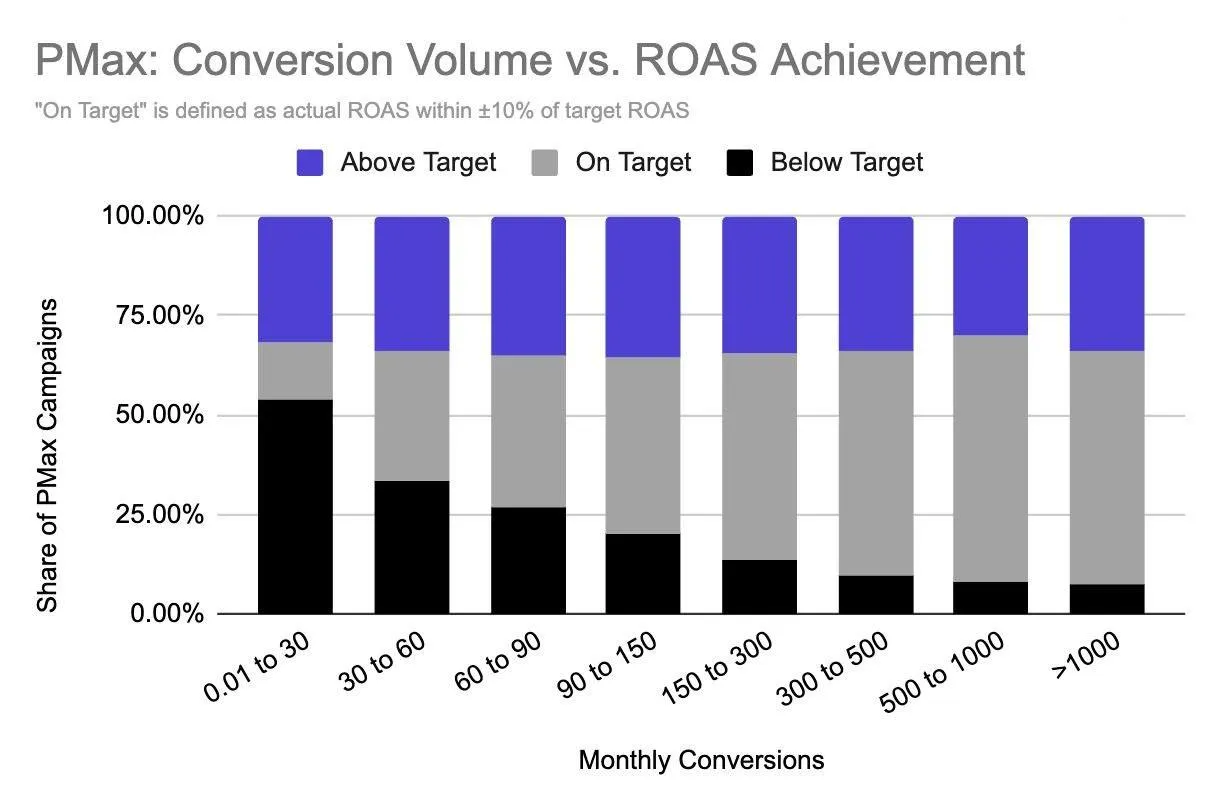
Numerous tests and Google’s own recommendations show that the algorithms need a minimum of 50 to 100 conversions per month to give stable results and hit the target ROAS. So creating a separate PMax campaign for each product on a small budget makes no sense. They simply will not perform. It is better to combine them into a single campaign and significantly increase the chances of success.
The more data the better.
What to look for in PMax during an audit
1. Strategy. Determine the campaign structure and the approach in use.
2. Historical data. Review the last six months. Are there enough conversions per month for PMax to work with? Remember the minimum of 50.
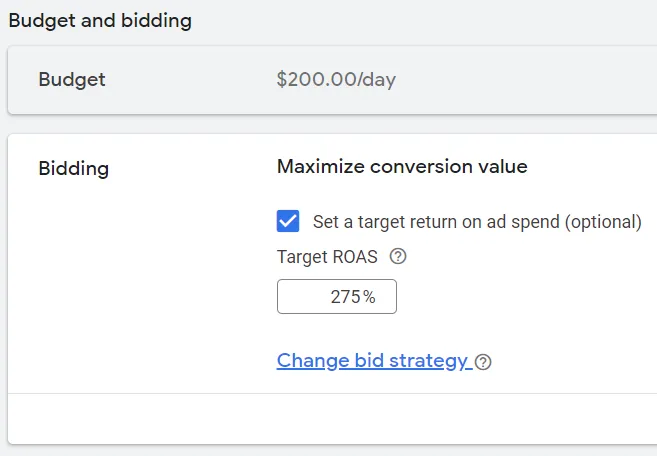
3. Budget and bid strategy. Is there enough budget, and is the right automated strategy selected? For ecommerce projects, in 90% of cases it should be Maximize conversion value, optionally with an active target ROAS.
4. Target ROAS. If one is active, make sure it is in line with the business goals, the products selected in the campaign, and their position in the market. Remember that target ROAS in PMax is not only a goal but also a lever. It lets you control budget spending and target more engaged user groups. Setting it very high can stop the campaign’s impressions completely.
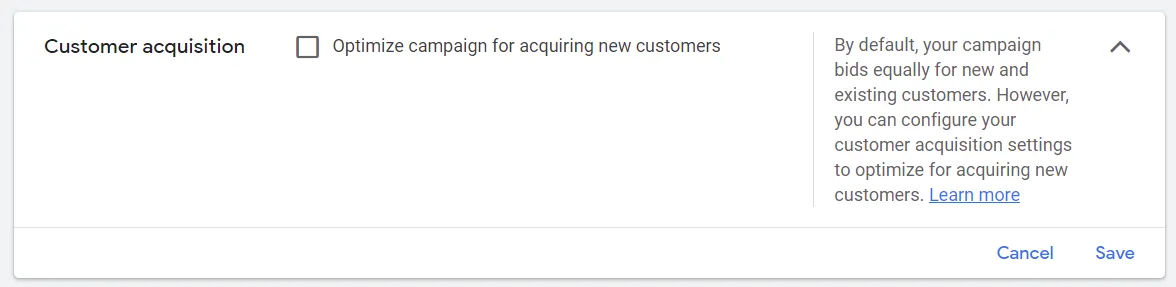
5. Customer acquisition. Clients often do not understand how this works and switch on “Optimize the campaign for acquiring new customers.” I recommend keeping it disabled.
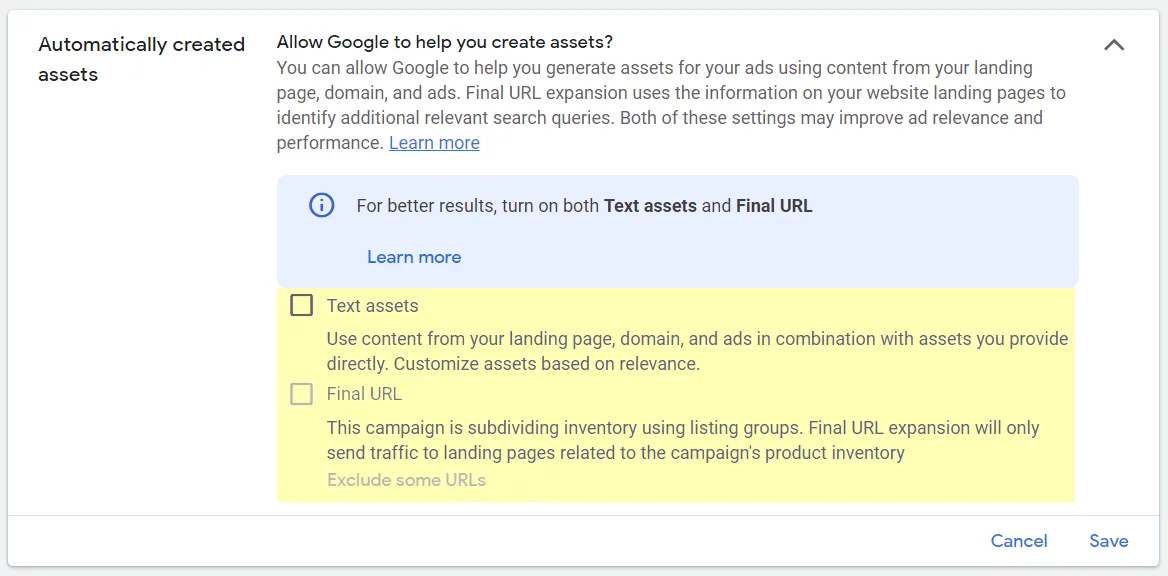
6. Automatically created assets. In Settings, make sure this is completely disabled for the feed-only approach. For the asset-based approach it is worth activating only the Text assets option. Activating the Final URL option allows PMax to reach every page on the site and behave like a DSA campaign. There is an option to set page exceptions, but it is easier to turn it off.
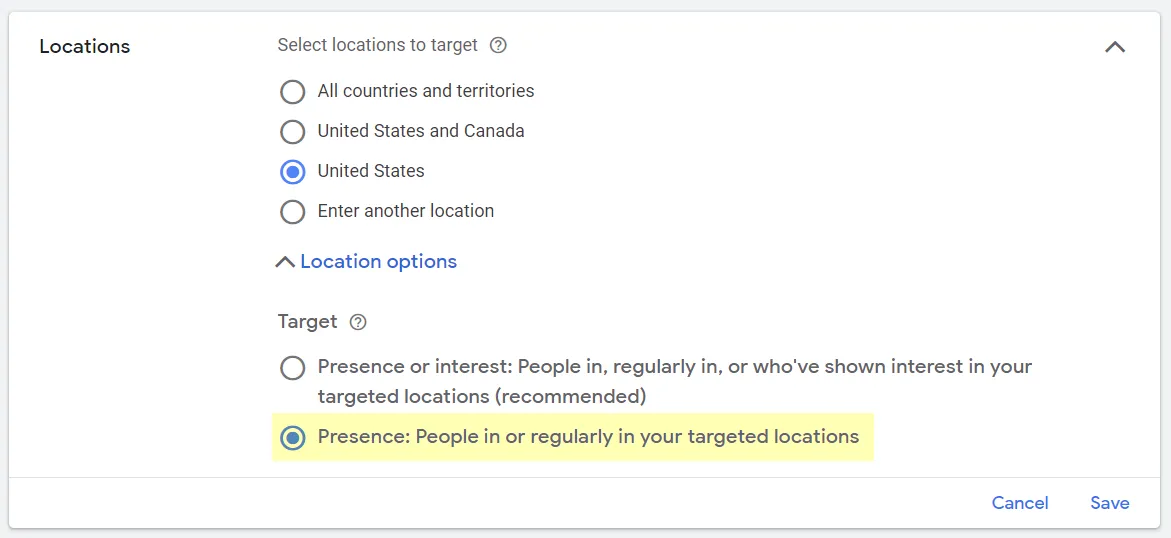
7. Geotargeting. In Locations, under Location options, make sure the Target type is set to Presence rather than the standard “Presence or interest.” This can seem trivial, but on large budgets it saves up to 5% on irrelevant clicks.
8. Products. In the Products section, check the overall status of the products. Even without access to Merchant Center, this shows the state of the data. Pay attention to product titles, and analyse the popular products selectively.
On top of these points, do not forget to check the overall account status and the conversion settings. Both significantly affect PMax. Errors in conversion tracking are, in my experience, the most common issue we find during account audits.
FAQ
How do you choose between PMax and Standard Shopping?
In the bluntest of terms: if you want to pursue revenue in the most aggressive way possible, and raw by-the-numbers performance is your top priority, PMax is probably for you. If you want or need specific reporting and controls, or a more customised implementation, Standard Shopping might be the way.
Does running a Search campaign still make sense next to Performance Max?
Yes. PMax is a keywordless technology, and its Search capabilities are most comparable to DSAs. There is still space in Google Ads for well-organised keyword campaigns, brand search campaigns, RSAs and the rest. Google itself describes running PMax alongside Search as an “Ads Power Pairing.”
I have a feed-only PMax campaign with a $500/day budget that continually spends $100/day. Can I get it to spend more?
It is a frequent situation, and a tricky question that depends a lot on your website, products, brands and account structure.
The long-term answer. Performance Max is fundamentally a demand capture campaign. There are potentially branding and demand generation placements in there, but they typically account for a minority of spend, and they are often in service of remarketing — more capture — rather than new customer acquisition. You might need to support PMax by generating more demand first. Otherwise PMax has no demand to capture.
The short-term answer. Lower your ROAS target. Work on feed hygiene and optimisation. Add audience signals. Increase or decrease segmentation. Improve the site.
Audience signals in PMax — are they a thing?
Yes. Audience signals are a key strategic and tactical element of Performance Max campaigns, though the performance impact is hard to know. Keep in mind that signals in PMax are start signals rather than targeting. In the ideal case, Google learns from your signal to improve performance and expands on it to find more new customers. In a bad case, Google misinterprets what was valuable to you about that signal, or drifts over time. It is worth reviewing and refreshing your signals periodically.
Should we add audience signals from the start, or hold off so PMax can learn on its own?
Nothing speaks urgently against waiting, and it arguably comes with the benefit of getting a feel for PMax’s baseline performance. Personally, there are enough unknowns already at work that I would rather influence PMax from the start. I cannot support the claim with data, but I would expect a shorter and more efficient learning period.